
Mobile Integrity Check (MIC)
Introduction
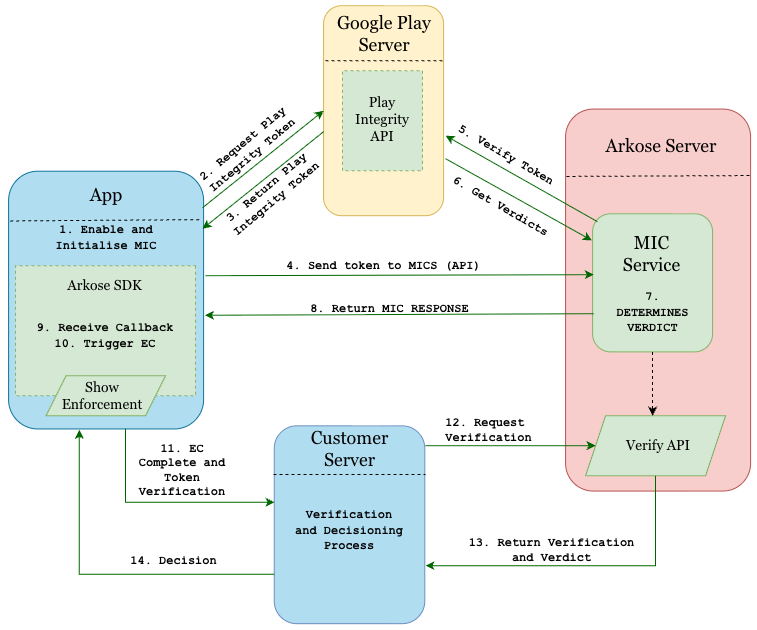
Mobile Integrity Check (MIC) integrates the Google Play Integrity API directly into the Arkose SDK, enabling verification of both app and device authenticity in the end-user's environment for Android. Under the hood, the SDK communicates with the Mobile Integrity Check Service (MICS), Arkose's backend API that manages all interactions with the Play Integrity API and processes the resulting verdicts.
While MIC confirms that a device is unrooted, the app is genuine, and the install originated from a legitimate store, integrity checks alone cannot detect malicious intent from users on trusted devices. MIC delivers its strongest protection when paired with the Arkose Titan platform, where MICS verdicts are combined with Arkose's intelligent threat detection models to identify and mitigate fraud farm activity, automation, and account abuse that integrity signals alone would miss.
High Level Diagram
Compatibility
The MIC feature of the Arkose Android SDK is compatible with Android devices running version 6.0 (API level 23) or higher, provided that Google Play services are supported.
Devices without Google Play services, such as those running unofficial firmware (modified Android versions not approved by the manufacturer or Google) or custom ROMs without Play certification (third-party customised Android versions that don't meet Google's security and compatibility standards), may not support the Play Integrity API's essential app and device integrity checks. As a result, its ability to ensure a secure and reliable app environment may be compromised, since the API relies on Google Play services for these validations.
Prerequisites
MIC must be enabled for your public key by the Arkose team
enableIntegrityCheck(true)only opts in on the client side. Contact your Arkose representative to enable MIC for each public key and environment. Until then, requests fail and no MICS fields are returned.
Dependencies
To ensure that the Google Play Integrity feature works properly within the app, the following dependencies must be added to the app-level build.gradle file.
These dependencies must be added regardless of whether MIC is enabled or disabled. The SDK references these libraries in its compiled bytecode, so they must be resolvable at both build time and runtime to avoid errors.
Maven/Gradle integrationsIf you are integrating the SDK via Maven/Gradle, these dependencies are resolved automatically through the SDK's POM file and no manual addition is required.
dependencies {
    // Retrofit core library
    implementation 'com.squareup.retrofit2:retrofit:2.9.0'
    // Gson converter for JSON serialization/deserialization
    implementation 'com.squareup.retrofit2:converter-gson:2.9.0'
    // OkHttp logging interceptor (optional, for logging network requests and responses)
    implementation 'com.squareup.okhttp3:logging-interceptor:4.9.0'
    // Play Integrity API
    implementation 'com.google.android.play:integrity:1.3.0'
    // Play Services Tasks (for handling tasks)
    implementation 'com.google.android.gms:play-services-tasks:18.2.0'
}
After adding the dependencies, in the Android Studio toolbar click File, then Sync Project with Gradle Files.
ProGuard Configuration
No ProGuard configuration is required in your app. All necessary rules are bundled inside the Arkose Mobile SDK and are automatically applied to your app's build.
Steps for Integration in an XML-based Application
Step 1: Enable Mobile Integrity in Configuration
final ArkoseConfig arkoseConfig = new ArkoseConfig.Builder()
    .apiKey(<YOUR_PUBLIC_KEY>)
    .enableIntegrityCheck(true) // To disable/enable mobile integrity check. Default is 'false'
    .build();
ArkoseManager.initialize(arkoseConfig, getApplication());
Step 2: Implement the Integrity Check Callback
Wait for the onIntegrityCheckCompleted() callback before proceeding to call showEnforcementChallenge(). MIC never blocks the Enforcement Challenge. We recommend initialising the SDK early so the integrity check finishes before your app calls showEnforcementChallenge(). If the Enforcement Challenge starts before the integrity check has completed, the only effect is that the mics_verdict object may be missing from the Verify API response for that session.
ArkoseManager.runIntegrityCheck(new ArkoseManager.OnIntegrityResponse() {
    @Override
    public void onIntegrityCheckCompleted(String message, boolean isSuccess) {
        // This callback happens on the main thread - safe for UI updates
        if (isSuccess) {
            Log.i(TAG, "Integrity passed: " + message);
        } else {
            Log.w(TAG, "Integrity failed: " + message);
        }
        // Always show the enforcement challenge, irrespective of integrity result
        showEnforcementChallenge();
    }
});
Steps for Integration in a Compose-based Application
Step 1: Enable Mobile Integrity in Configuration
val config = ArkoseConfigCompose(
    apiKey = "<YOUR_PUBLIC_KEY>",
    enableIntegrityCheck = true // To disable/enable mobile integrity check. Default is 'false'
)
Step 2: Implement the Integrity Check Callback
Call runIntegrityCheck() and wait for the onIntegrityCheckCompleted() callback before showing the Enforcement Challenge.
@Composable
fun LoginScreen() {
    var showEc by remember { mutableStateOf(false) }
    var integrityResult by remember { mutableStateOf<Boolean?>(null) }
    val applicationContext = LocalContext.current.applicationContext

    val arkoseConfig = ArkoseConfigCompose(
        apiKey = "<YOUR_PUBLIC_KEY>",
        enableIntegrityCheck = true // To disable/enable mobile integrity check. Default is 'false'
    )
    LaunchedEffect(Unit) {
        // Run initialization on IO dispatcher to avoid blocking main thread
        withContext(Dispatchers.IO) {
            ArkoseManagerCompose.initialize(applicationContext, arkoseConfig)
        }
        ArkoseManagerCompose.runIntegrityCheck(applicationContext, object : ArkoseManagerCompose.OnIntegrityResponse {
            override fun onIntegrityCheckCompleted(message: String, isSuccess: Boolean) {
                // Already on main thread - safe for UI updates
                if (isSuccess) {
                    Log.i(TAG, "Integrity check passed: $message")
                } else {
                    Log.w(TAG, "Integrity check failed: $message")
                }
                integrityResult = isSuccess
            }
        })
    }
    // UI updates automatically when state changes
    Column {
        // Optionally reflect integrity status in the UI
        integrityResult?.let { success ->
            Text(
                text = if (success) "Integrity check passed" else "Integrity check failed",
                color = if (success) Color.Green else Color.Red
            )
        }
        // Always available, regardless of integrity result
        Button(onClick = { showEc = true }) {
            Text("Show Enforcement Challenge")
        }
        if (showEc) {
            EnforcementChallenge(
                onDismiss = { showEc = false },
                config = arkoseConfig,
                onCompleted = { /* Handle completion */ }
            )
        }
    }
}
Callback Parameters
| Parameter | Type | Description |
|---|---|---|
message | String | Status message, for example "Integrity check process completed" |
isSuccess | boolean | true if the integrity check passed, false if it failed or could not complete |
MIC Integration Steps for React Native App
Before you begin, follow the mentioned steps to set up the ArkoseLabs SDK for React Native in your host application. MIC requires
react-native-arkoselabsv3.0.0 or later.
Dependencies and ProGuard
No changes are needed. The React Native module declares the Play Integrity, Retrofit and OkHttp dependencies internally, and the required ProGuard rules ship inside the Android SDK. Your app's build.gradle does not change.
Platform behaviour
Android: enableIntegrityCheck opts in and runIntegrityCheck() runs the check. The result arrives as the onIntegrityCheckCompleted event.
iOS: enableIntegrityCheck is ignored and runIntegrityCheck() emits onError ("not supported on iOS"). Guard the call with Platform.OS === 'android'.
Steps for Integration in a React Native Application (Android)
MIC never blocks the Enforcement Challenge. We recommend initialising the SDK early so the integrity check finishes before your app calls showEnforcementChallenge(). If the Enforcement Challenge starts before the integrity check has completed, the only effect is that the mics_verdict object may be missing from the Verify API response for that session.
The three steps below belong in one effect, in this order: subscribe, initialise, run.
Step 1: Subscribe to the integrity callback
Subscribe to onIntegrityCheckCompleted before running the check so the result is not missed. Show the Enforcement Challenge from the callback, irrespective of the result.
Step 2: Enable Mobile Integrity in the configuration
Pass enableIntegrityCheck: true in the configuration given to initialize(). The check reports on the configuration that was applied, so changing the flag without re-applying the configuration has no effect.
Step 3: Trigger the Mobile Integrity Check
Call ArkoseManager.runIntegrityCheck() on Android. The event fires exactly once per call. It also fires when the flag is off or the SDK is not initialised; isSuccess is then false and message says why (for example INTEGRITY_CHECK_NOT_ENABLED).
import { ArkoseEvents, ArkoseManager } from "react-native-arkoselabs";
import React from "react";
import { Platform } from "react-native";

const arkoseConfig = {
  apiKey: "your-api-key",                              // Your public key from Arkose Labs
  apiBaseUrl: "https://client-api.arkoselabs.com/v2",  // Optional; this is the default. Replace with your vanity URL if Arkose Labs provided one
  enableIntegrityCheck: true,                          // Optional, Android only. Default is false
};

React.useEffect(() => {
  // Step 1: subscribe before running the check so the result is not missed
  const sub = ArkoseEvents.addListener("onIntegrityCheckCompleted", ({ message, isSuccess }) => {
    console.log("Integrity check:", isSuccess, message);
    // Always show the enforcement challenge, irrespective of integrity result
    ArkoseManager.showEnforcementChallenge({ /* ... */ });
  });

  // Step 2: initialise with enableIntegrityCheck: true
  ArkoseManager.initialize(arkoseConfig);

  // Step 3: run the check (Android only; iOS would emit onError)
  if (Platform.OS === "android") {
    ArkoseManager.runIntegrityCheck();
  }

  return () => sub.remove();
}, []);
Callback Parameters (React Native)
| Parameter | Type | Description |
|---|---|---|
| message | String | Status message, for example "Integrity check process completed" |
| isSuccess | boolean | true if the integrity check passed, false if it failed or could not complete |
See Error Codes below for the SDK and PlayIntegrity errors.
Message Templates
Positive case (isSuccess = true)
"Integrity check process completed"This message indicates the integrity check process finished without error.
Negative case (isSuccess = false)
Example:
"Standard Integrity API error (-9): Binding to the service in the Play Store has failed.
This can be due to having an old Play Store version installed on the device"
Integrity check failure is non-blockingEven when
isSuccessisfalse, the Arkose challenge flow can and should proceed.
Important Notes
- Initialize the SDK with
enableIntegrityCheck = trueas early as possible, such as in your Application class or your Activity'sonCreate()method, to ensure the Play Integrity check completes before user interactions. - The integrity check runs asynchronously in the background.
- The callback is automatically invoked on the main thread, making it safe for UI updates.
showEnforcementChallengeshould be invoked after theonIntegrityCheckCompletedcallback. An Enforcement Challenge started before this callback may proceed without the device integrity result.
How You Receive Verdicts
The SDK does not return verdicts to your app. The onIntegrityCheckCompleted callback reports only whether the check completed. Verdicts are available in the mics_verdict object of the Verify API response.
Error Codes
The errors are categorised into two sections:
- Play Integrity Token Errors: Errors encountered when fetching the Play Integrity token.
- SDK Errors: General network failures and unexpected situations.
Play Integrity Token Errors
The following are standard error codes for Play Integrity token fetching on the Android side:
| Error Code | Description |
|---|---|
API_NOT_AVAILABLE | Standard Integrity API is not available. |
CANNOT_BIND_TO_SERVICE | Binding to the service in the Play Store has failed. |
CLIENT_TRANSIENT_ERROR | There was a transient error in the client device. |
GOOGLE_SERVER_UNAVAILABLE | Unknown internal Google server error. |
INTERNAL_ERROR | Unknown internal error occurred. |
NETWORK_ERROR | No available network was found to fetch the token. |
PLAY_SERVICES_NOT_FOUND | Play Services is not available or the version is too old. |
PLAY_SERVICES_VERSION_OUTDATED | Play Services needs to be updated to support the Integrity API. |
PLAY_STORE_NOT_FOUND | No Play Store app is found on the device or it is not an official version. |
PLAY_STORE_VERSION_OUTDATED | The Play Store version installed on the device needs to be updated. |
SDK Errors
This section covers other error scenarios that could occur due to network issues or unexpected conditions:
| Error | Description |
|---|---|
INVALID_PUBLIC_KEY | The provided public key is invalid. |
EMPTY_PUBLIC_KEY | No public key was provided in the request. |
MISSING_DEPENDENCIES | Required dependencies are missing. |
REQUIRES_APPLICATION_CONTEXT | Application context is invalid. |
Frequently Asked Questions
Where do I get the integrity verdicts?
Not from the SDK. The onIntegrityCheckCompleted callback only reports whether the check completed. Verdicts are returned to your backend in the mics_verdict object of the Verify API response.
The onIntegrityCheckCompleted callback returned isSuccess = false. Should I proceed with the Enforcement Challenge?
Yes. Always proceed to start the Enforcement Challenge regardless of the callback result.
I set enableIntegrityCheck(true) but no MICS fields appear in the Verify response.
MIC has to be enabled for your public key by the Arkose team. Until then, requests fail with FORBIDDEN_403 and no verdict is produced. Contact your Arkose representative, and confirm enablement for every public key and environment you test against.
Which devices are supported?
Android 6.0 (API level 23) and above, with Google Play services available. On older devices, or devices without Play services or Play certification, MIC is skipped and the challenge flow continues normally.
Do I still need the dependencies if MIC is disabled?
Yes. The SDK references those libraries in its compiled bytecode, so they must resolve at build and runtime regardless. If you integrate via the Arkose Authenticated Package Manager, the SDK's POM resolves them for you.
Do I need to add ProGuard rules?
No. All required rules ship inside the SDK and are applied to your build automatically.
Does MIC add latency to the challenge?
The check runs asynchronously in the background when the SDK initialises, with a timeout, and never blocks the challenge. Initialise as early as possible so it completes before the user reaches the challenge.
Does MIC work on Fire TV, Fire tablets, or Android TV?
Amazon devices running Fire OS ship the Amazon Appstore without Google Play services, so the Play Integrity API is unavailable and no verdict is produced. You will typically see PLAY_STORE_NOT_FOUND or PLAY_SERVICES_NOT_FOUND. Android TV devices that are Play-certified and include Google Play services do support MIC. In both cases the challenge flow is unaffected.
Updated 11 days ago